It is now ready to move your membership from Matchi to Court22
As previously informed, Oslo Tennisklubb is now switching to Court22 as our new club system.
This is an important step in ensuring a more transparent, flexible and modern solution for all members.
When you open Court22 App or enter Court22 via browser:
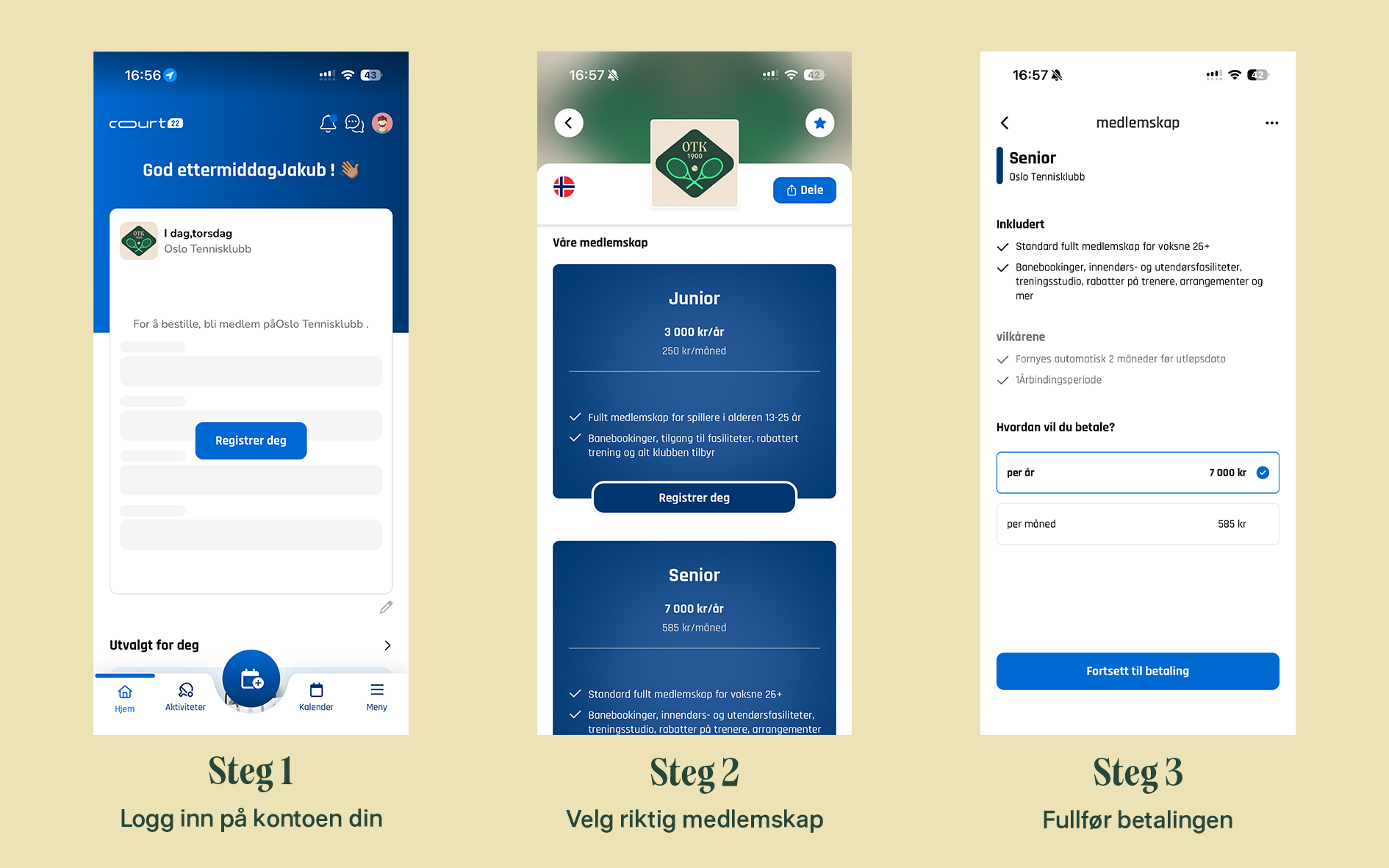
The membership structure is the same as before, but availability in Court22 varies:
theres no new membership categories, and no changes to who is entitled to which memberships.
All members must “buy” the same membership they had in 2025. Send mail to post@oslotk.no if you have notified us in 2025 about the change of membership
Examples:
The membership is directly linked to:
Incorrect membership may result in limited access or need for correction in the aftermath.
Under “Membership” you can see an active activation membership. This is only a technical solution that allows you to purchase the right membership.
If you can't get a purchased membership, it's most likely because this isn't linked to your profile yet. Get in touch with us at post@oslotk.no, then we'll sort it out quickly.
The main member of the family “buys” the family membership in Court22. Shortly after the purchase, we will Manually activate the rest of the family, just as you had in the past in Matchi.
Every family member must have his own Court22 account, since membership, access and booking are tied to individual users.
Would you like to add or remove family members, or if your family situation has changed, please contact us and we will help you. Changes are made not automatically, and always in dialogue to make sure everything gets right.
Going forward is Court22 only valid solution for membership “purchase” in Oslo Tennisklubb.
This ensures correct access, automation and equal treatment of all members.
We know this may feel a little unfamiliar and maybe a little technical, but this is a disposable thing which you don't have to do again later.
Of course, we are here to help you.
Start by looking through Frequently Asked Questions (FAQ) below. If you can't find the answer there, you are welcome to contact us at post@oslotk.no, or via WhatsApp, where we are quickly available and ready to help.
Court22 is Oslo Tennisklubb's new club system. It handles memberships, course bookings, discounts and access to club activities — all in one place, both in-app and online. Going forward, Court22 will be the main platform for the club. We have sent invitations to all our members and course participants. If you still haven't received an invitation, that's fine. You can easily download Court22 App, create a profile and search Oslo Tennis Club. Add the club as your favorite facility -- and you're good to go. If you want more information about Court22, you can also read our previous article here.
You are most likely logged in with a other email address than the one we have registered in the system.
Get in touch with us at post@oslotk.no, and we will help you connect the right account.
Once the family membership is purchased, we will activate the same family members that you previously had in Matchi.
If you want to make changes, please contact us.
Keep in mind that all family members must have their own Court22 account.
Oslo Tennis Club is starting a Modernization of club systems.
To ensure a simple and fair solution for everyone - with the right access, prices and booking - membership must now purchased individually in Court22.
Think of it like other subscription services (such as Netflix):
you manage it yourself in the platform.
We recommend purchasing the membership as soon as possible. Membership must be active in Court22 to ensure full access to booking, pricing and club offers.
If the wrong membership is “purchased”, this may result in restricted access or missing discounts.
If you are unsure, we recommend that you Please contact us before “buying”, and we will help you.
Yep. Accepting the invitation gives you access to Court22, but you still have to actively “buy” the membership in the system.
Yep. Court22 works both as mobile app and in browser on PC/Mac, and your account works across devices.